How to Register and Use Metrash2 App in Qatar 2026
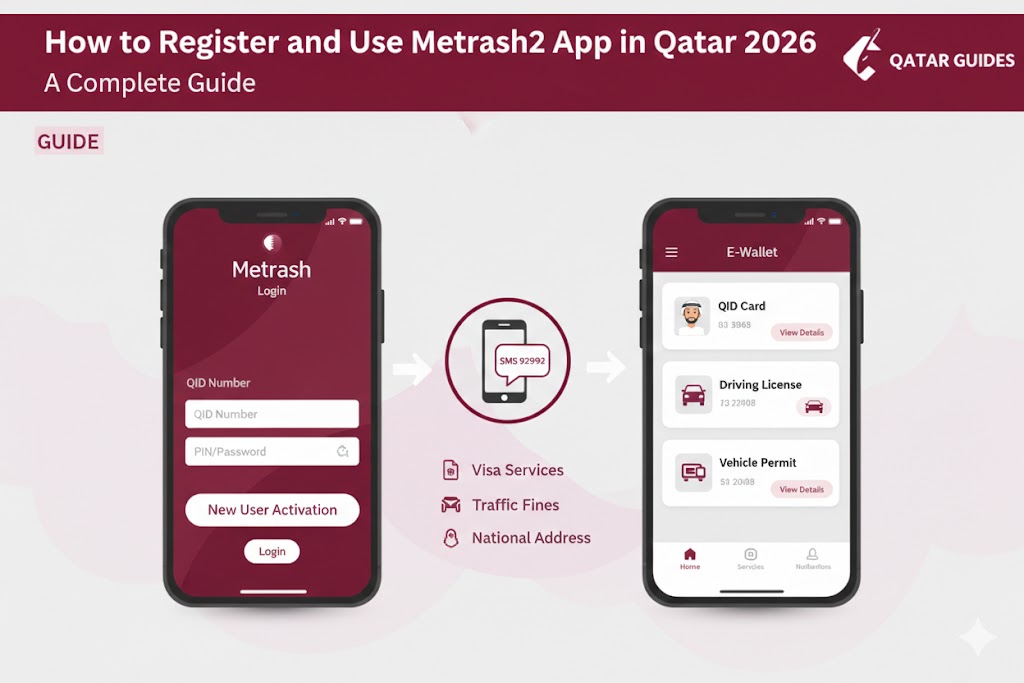
The Metrash2 app (now updated to the new Metrash version) is the digital backbone of government services in Qatar. Managed by the Ministry of Interior (MOI), it offers over 450+ services, allowing residents to handle everything from visa renewals to traffic fines without visiting a service center.
In 2026, the app has introduced AI-driven features, biometric login, and an expanded E-Wallet to make life even easier for the community.
1. Prerequisites for Metrash2 Registration
Before you begin the activation process, ensure you have:
- A Valid Qatar ID (QID): Your residency must be active.
- Mobile Number in Your Name: The SIM card must be registered under your QID. If it’s under your company’s name or a different person’s QID, you cannot activate the app.
- Smartphone: Compatible with Android or iOS.
2. Step-by-Step Registration & Activation Process
Step 1: Download the App
Search for “Metrash” or “Metrash2” on the [Google Play Store] or [Apple App Store] and install the latest version (4.0 or above).
Step 2: Initial Login
- Open the app and select your preferred language (Arabic, English, Urdu, etc.).
- Enter your QID Number and Expiry Date.
- The app will prompt you to send an SMS to 92992.
Step 3: Activation via SMS
The app will automatically draft a message. Simply click “Send.” You will receive an SMS containing a two-part activation key:
- Part 1: Received via SMS.
- Part 2: Displayed on the screen or sent separately.
- Note: In the 2026 updated version, this process is often automated through a single OTP (One-Time Password).
Step 4: Set Your PIN
Enter both parts of the activation key and create a 6-digit PIN. This PIN will be your permanent password for the app. You can also enable Fingerprint or Face ID for faster access.
3. Key Features of Metrash2 in 2026
- Digital Wallet (E-Wallet): Access digital copies of your QID, Driving License, and Vehicle Permit. These are legally recognized by traffic patrols.
- Visa Services: Apply for and extend [Qatar Family Visit Visas] or [Residence Visas].
- Traffic Services: Check and pay traffic violations with a 50% discount (if applicable).
- National Address: Update your home address, which is mandatory for all residents.
- Leave Notifications: Manage exit permits and return permits for dependents.
4. How to Use Metrash2 on a Second Device
If you want to use the app on another phone:
- Download the app on the new device.
- Enter your QID and existing PIN.
- A temporary activation code will be sent to your first device.
- Enter that code on the new device to complete the sync.
5. Important Internal Links
- Driving Help: Once registered, you can apply for your Qatar Driving License.
- Medical Services: Use the app to track medical results for your Hamad Health Card.
Frequently Asked Questions (FAQs)
What should I do if I forget my Metrash2 PIN? Click on “Forgot Password” on the login screen. You will need to re-verify your QID expiry and receive a new activation code via SMS to reset it.
Can I use Metrash2 if my mobile number is not under my QID? No. You must visit an Ooredoo or Vodafone center to transfer the number to your name/QID before you can activate Metrash2.
Is there a fee for the Metrash2 app? The app itself is free to download and use. However, individual government services (like visa renewals) carry their own official fees.