How to Upload Documents in Metrash2 for Qatar Family Visa
From Personal Experience: When I first tried to upload documents in Metrash2 for my family visa, I kept hitting errors, file too large, wrong format, blurry image rejection. Nobody told me the documents had to be in JPG (not PDF), merged into a single file under 500 KB. I figured it out the hard way after two failed submissions. This guide covers exactly what I wish I had known from day one.
Metrash2 is the official mobile app of Qatar’s Ministry of Interior (MOI). It allows residents to apply for family visit visas, family residence visas, and a wide range of other government services, all from a smartphone. The entire family visa application process in Qatar is now handled through Metrash2. No walk-in applications are accepted for most visa types as of 2024.
Document upload is the single most critical step in the process. Even one blurry scan, a wrong file format, or a missing certificate can delay your application by weeks or result in an outright rejection. Getting this step right the first time saves you significant time and frustration.
| Important: New Metrash App (March 2025) Starting March 1, 2025, Qatar’s Ministry of Interior replaced the old Metrash2 app with a new, updated version simply called “Metrash.” If you still have the old app installed, download the new version from the Google Play Store or Apple App Store. The document upload process and navigation remain essentially the same, but the interface has been refreshed. All references to “Metrash2” in this guide apply to the current Metrash app as well. |
Before You Start: Eligibility and Requirements
Before uploading a single document, confirm that you meet Qatar’s eligibility criteria for sponsoring a family visa. Submitting an application without meeting these requirements will result in rejection regardless of how perfectly your documents are prepared.
Minimum Salary Requirements (2026)
- Government sector employees: minimum monthly salary of QR 10,000 (or employer-provided housing)
- Private sector employees (with company-provided accommodation): minimum QR 6,000/month
- Private sector employees (without company accommodation): minimum QR 10,000/month
- For family visit visa only: minimum QR 5,000/month (varies by profession)
Eligible Family Members
- Spouse (husband or wife)
- Children under 18 years of age
- Parents (subject to additional scrutiny and higher salary thresholds)
| Who Is NOT Eligible Siblings, cousins, in-laws, uncles, aunts, and other extended family members are generally not eligible under the standard family visit or residence visa category. Sponsoring these relatives requires exceptional approval from the MOI and is rarely granted. |
Other Eligibility Conditions
- You must hold a valid Qatar Residence Permit (QID) as the sponsor
- Your profession must be in a skilled or professional category, labor-category job titles are typically ineligible
- Your employment contract must be linked to the Metrash system (your employer handles this)
- You must have valid proof of accommodation, an attested tenancy contract or proof of company housing
| Pro Tip: If the “Issue Visa” option does not appear in your Metrash2 app, your employment contract may not be linked to the system. Contact your company’s HR or PRO department to have it registered with Metrash before attempting to apply. |
Document Checklist by Relationship Type
The documents you need to upload depend on your relationship to the visa applicant. Use the table below as your master checklist before starting the upload process in Metrash2.
| Relationship | Sponsor Documents | Family Member Documents |
| Wife / Husband | Sponsor’s QID copy Salary certificate Tenancy contract / accommodation proof Employment contract | Spouse’s passport copy Marriage certificate (attested) Passport-size photo Health insurance certificate |
| Children (under 18) | Sponsor’s QID copy Salary certificate Tenancy contract | Child’s passport copy Birth certificate (attested) Parents’ marriage certificate Passport-size photo |
| Parents | Sponsor’s QID copy Salary certificate (higher threshold) Tenancy contract NOC from employer | Parent’s passport copy Birth certificate of sponsor (attested) Passport-size photo Health insurance certificate |
Additional Document Notes
- All documents in a language other than English or Arabic must be officially translated and attested before uploading.
- Marriage certificates and birth certificates issued outside Qatar must be attested by the issuing country’s Ministry of Foreign Affairs and then by the Qatar Embassy in that country (or via Apostille, if applicable).
- Salary certificates should be recent, issued within the last 30 to 60 days, and signed by your HR department on official company letterhead.
- Tenancy contracts must be attested by the relevant authority in Qatar. Unattested contracts are not accepted.
- Health insurance is mandatory for family visit visas. Ensure coverage is valid and the certificate clearly shows the family member’s name, coverage dates, and policy number.
File Format and Size Rules for Metrash2 Upload
This is where most applicants make mistakes. Metrash2 has very specific technical requirements for the files you upload. Ignoring these rules is the most common reason applications fail at the document stage.
The Four Non-Negotiable Upload Rules
- Format, JPG format only, Metrash2 does not accept PDF files for document uploads in the family visa section. Every document must be saved as a .jpg (JPEG) image file. If your documents are in PDF format, convert each page to JPG before uploading.
- Size Limit, File size must be under 500 KB, Each uploaded file cannot exceed 500 KB. Large, high-resolution scans will be rejected. Compress the image using a free tool like Smallpdf, iLovePDF, or TinyJPG to reduce the file size without losing readability.
- Multi-Page Documents, Multi-page documents must be merged into one JPG, If a document has multiple pages (for example, a 4-page marriage certificate), you must combine all pages into a single JPG file before uploading. Do not upload pages separately. Use a free tool like iLovePDF, Img2Go, or Adobe’s online tools to merge pages into one image.
- Image Quality, Documents must be clear and fully readable, Blurry, dark, or partially cropped documents will be rejected by MOI reviewers. Scan on a flat surface with good lighting. If photographing with a phone, use the document scan feature in your phone camera app for best results.
| Quick Summary of Technical Requirements Format: JPG only (not PDF, not PNG, not Word) | Size: Under 500 KB per file | Multi-page docs: Merge into one JPG | Quality: Clear, fully readable, no cropping |
How to Convert PDF to JPG (Free Methods)
- Online: Go to ilovepdf.com or smallpdf.com. Upload your PDF and convert each page to JPG. Download and compress to under 500 KB.
- iPhone: Open the PDF in the Files app. Take a screenshot of each page and save as JPG. Use the Compress Photos app to reduce size.
- Android: Open the PDF in Google Drive or Adobe Acrobat. Use a screenshot or the “Save as Image” export option.
- Windows PC: Open the PDF in Microsoft Edge. Take a screenshot (Windows + Shift + S) of each page. Save as JPG and compress.
| Pro Tip: Before starting your Metrash2 session, prepare all your documents, convert them to JPG, merge multi-page files, and verify each file is under 500 KB. Having everything ready before opening the app prevents timeouts and errors during upload. |
Step-by-Step: How to Upload Documents in Metrash2
Follow these steps exactly. The app uses Arabic and English, so screenshots may show both languages. The navigation below is based on the English interface.
Part A: Setting Up the Application
- Open the App and Log In — Open the Metrash2 (or new Metrash) app on your phone. Log in using your QID number and your registered PIN. Make sure you are logging in as the sponsor, not as a family member.
- Tap the Visa Icon, On the home screen, tap the “Visa” icon. This takes you to the visa services menu.
- Select Issue Visa, Tap “Issue Visa.” You will see a dropdown menu of visa types.
- Choose Family Visit, Tap “Family Visit.” This is the starting point for both family visit visas and family residence visa applications.
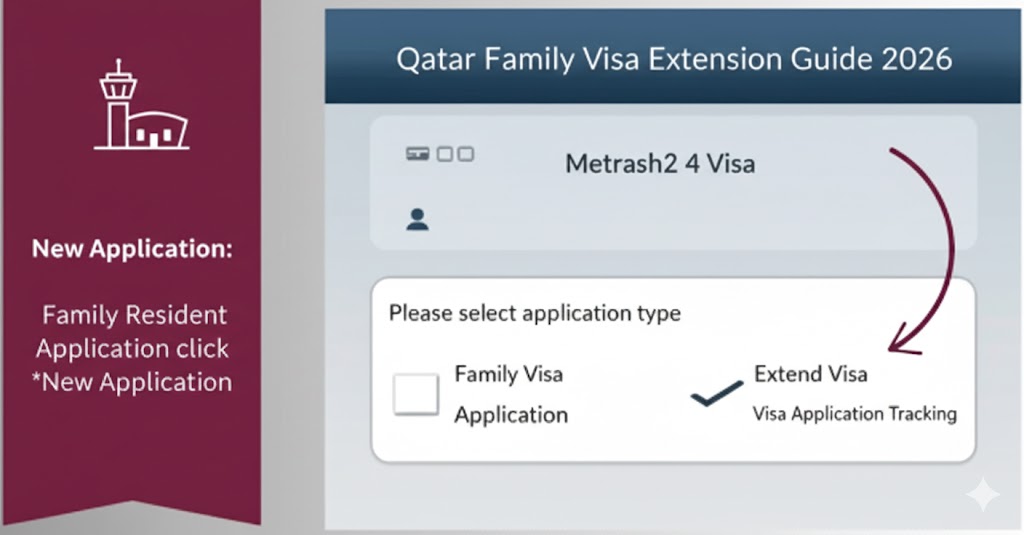
- Choose the Correct Visa Type, You will see two options: “Family Visa Application” (for visit visa) and “Family Resident Application” (for residence visa). Select the one that matches your purpose. For most first-time applicants bringing a spouse or child to live in Qatar, choose “Family Resident Application.” For a short-term visit, choose “Family Visa Application.”
- Start a New Application, Tap “New Application” to begin.
Part B: Filling in Visitor Details
- Enter Visitor Information, The app will ask you to enter the details of the person you are sponsoring: full name as it appears on the passport, nationality, passport number, passport expiry date, relationship to you (wife, child, parent, etc.), and date of birth.
- Verify the Details, Double-check every field for accuracy. A single character error in a passport number will cause a rejection. The name must match the passport exactly, including spelling.
- Validate and Proceed, Tap “Validate” after filling in all the required fields. The app will verify your entry. If no errors appear, tap “I agree with the validity of the data” and then tap “Next.”
Part C: Uploading the Documents
- Reach the Document Upload Screen, After tapping Next, the app will display a document upload screen. You will see placeholders or slots for each required document. The exact slots depend on the relationship type you selected.
- Upload Each Document, Tap on each document slot to upload the corresponding file from your phone’s gallery. Remember: files must be in JPG format, under 500 KB, and multi-page documents must already be merged into a single JPG.
- Match Documents to the Correct Slot, For the sponsor’s documents (your QID, salary certificate, tenancy contract), upload these in the designated sponsor section. For the family member’s documents (passport, marriage or birth certificate, health insurance), upload these in the applicant section.
- Preview Each Uploaded File, After uploading each file, the app shows a small preview thumbnail. Tap the thumbnail to verify the document is fully visible, clear, and not cut off. If it looks blurry or cropped, re-upload a better version before proceeding.
- Tap Next to Proceed, Once all slots are filled, tap “Next.”
Part D: Confirming and Submitting
- Review the Summary, A summary screen will appear showing all the information and documents you have entered. Review everything carefully. Check names, passport numbers, document types, and relationship.
- Confirm Submission and Get Application Number, If everything looks correct, tap “Yes” or “Confirm” to submit the application. You will immediately receive an application number. Save this number, you will need it to track your visa status.
- Save Your Application Number, You will also receive an SMS notification confirming that your application has been submitted. Keep your phone accessible for further status updates.
| Do Not Pay Before Approval The QR 200 visa fee is NOT paid at the time of submission. You only pay after the MOI approves your application. When the status in Metrash2 shows “Approved,” open the app, locate your application, and complete the payment by credit or debit card. Paying before approval is not possible. |
How to Track Your Application Status
After submitting your documents, you can monitor your application status directly in Metrash2 or through the MOI website. You do not need to visit any office to check status.
Method 1: Metrash2 App
Open Metrash2 and log in. Go to Visa > Inquiries > Visa Approval Tracking. Enter your application number. The current status will appear instantly.
Method 2: MOI Qatar Website
Go to moi.gov.qa. Click on Inquiries, then Visa Services, then Visa Inquiry and Printing. Enter the applicant’s passport number and nationality. Complete the CAPTCHA and click Submit. Family members outside Qatar can also use this method to check from abroad.
| Application Status | What It Means |
| Under Process | Your application has been submitted and is in the review queue. No action needed, this is the first normal stage. |
| Under Review | An MOI officer is actively checking your documents and verifying eligibility. This is a positive sign. |
| Back to Under Process | The application moved to a senior officer for final authorization checks before CID clearance. Still normal. |
| CID Clearance | A background check is being performed (adults only). Children under 14 skip this step. Takes about one week on average. |
| Approved | Your visa is approved. Log in to Metrash2 to pay the QR 200 fee and download the visa. |
| Rejected | Application was not approved. Check the reason in Metrash2, correct any document issues, and reapply or contact MOI helpline. |
| Pro Tip: Processing typically takes 2 to 5 working days for family visit visas and 1 to 2 weeks for family residence visas. Avoid calling the MOI helpline or visiting in person unless it has been more than 3 weeks with no status update. The system processes applications in order of submission. |
Fees for Qatar Family Visa (2026)
Here is a complete breakdown of all fees involved in the Qatar family visa process.
| Service | Fee (QAR) | Paid Via | Notes |
| Family Visit Visa (30 days) | QR 200 per person | Metrash2 / MOI office | Paid after approval, not at submission |
| Visa Extension (30 days) | QR 200 per person/month | Metrash2 / MOI portal | For spouse, children: up to 5 months |
| Medical Examination | QR 100 per person | At the health center | Required before visa extension |
| Family Residence Visa Entry Permit | QR 200 | Metrash2 | One-time for initial entry |
| Residence Permit (QID) | QR 500/year | MOI Service Center | After entry and medical clearance |
| Overstay Fine | QR 200 per day | — | Applies if visa expires without extension |
| How to Pay After Approval When your Metrash2 status shows “Approved,” open the app and navigate to your application. You will see a “Pay” button. Select your credit or debit card and complete the transaction. After payment is confirmed, download the visa from the same screen. Print a copy for your family member to present at the airport when they travel to Qatar. |
Common Upload Errors and How to Fix Them
“File size too large” Error
Your file exceeds 500 KB. Compress it using TinyJPG (tinyjpg.com) or iLovePDF (ilovepdf.com). Reduce JPEG quality to 70–80%, the document remains readable at this quality. Re-upload the compressed file.
“Invalid file format” Error
Your file is in PDF, PNG, HEIC, or another unsupported format. Convert it to JPG before uploading. iPhones often save photos in HEIC format by default, change your camera settings to JPEG in Settings > Camera > Formats > Most Compatible.
Upload Freezes or Does Not Complete
This usually happens due to a slow internet connection or a temporary server issue. Switch from mobile data to Wi-Fi (or vice versa) and try again. If it persists, close the app, reopen it, and restart the upload from the document screen. Your form data is typically saved.
Application Shows “Rejected” Due to Document Issues
Open Metrash2 and check the rejection reason. Common causes include: unattested marriage or birth certificate, blurry or unreadable scan, missing health insurance certificate, salary certificate not on company letterhead, or a document name mismatch with the passport. Correct the specific issue, then reapply. You must start a new application, rejected applications cannot be edited and resubmitted.
Document Slot is Not Visible for a Specific Document
Some document slots only appear based on the relationship type you selected. If a slot for a birth certificate is missing, go back and confirm you selected the correct relationship (e.g., “child” rather than “dependent”). If the slot for a health insurance certificate is not showing, confirm you selected the correct visa type (health insurance is mandatory for visit visas, not always for residence visas).
After Visa Approval: What Happens Next?
Pay the Fee and Download the Visa
As explained above, pay QR 200 per person through Metrash2 once the status shows Approved. Download and print the visa. Your family member needs this document to board their flight to Qatar.
Entry Window
Your family member must enter Qatar within 90 days of the visa approval date. If they do not travel within this window, the visa expires and you will need to reapply.
Medical Examination After Arrival
Within 72 hours of arriving in Qatar, adult family members (15 years and older) must complete a medical examination at an MOI-authorized health center. Tests include a chest X-ray (for tuberculosis), blood tests (for HIV and hepatitis B and C), and a general physical review. Children under 15 are typically exempt. Results are sent electronically to the MOI system within 2 to 3 days.
Biometric Registration
After medical clearance, family members must visit an MOI Service Center for biometric registration, digital fingerprinting and, in some cases, iris scanning. This creates their unique digital identity in Qatar’s immigration system.
Applying for the Residence Permit (QID)
The final step for family residence visas is applying for each family member’s Qatar ID (Residence Permit). This can be done through Metrash2 or at any MOI Service Center. The cost is QR 500 per person per year.
Visa Extension (for Visit Visa Holders)
If your family member is on a visit visa and wants to stay longer, you can extend it online via Metrash2 or the MOI portal. The extension fee is QR 200 per person per month. Spouses and children can extend up to 5 months; other approved relatives can extend up to 3 months. A medical examination (QR 100) is required before the first extension.
Frequently Asked Questions
Can I upload PDF files in Metrash2?
No. The Metrash2 app requires documents to be in JPG format for family visa applications. PDF files will be rejected or fail to upload. Convert all documents to JPG before starting.
What if my document has multiple pages?
Combine all pages into a single JPG file using a free online tool like iLovePDF or Img2Go. Do not upload each page separately. The combined file must still be under 500 KB.
My salary is below the threshold. Can I still apply?
In most cases, no. The MOI will reject applications from sponsors who do not meet the salary threshold. If you receive housing from your employer, that may reduce the cash salary requirement. Confirm your specific situation with your HR department or the MOI helpline at 920008009.
How long does document processing take?
Family visit visa applications typically take 2 to 5 working days. Family residence visa applications take 1 to 2 weeks on average. Delays can occur during peak periods such as the start of a new academic year or major holidays.
Can my family member check the visa status from outside Qatar?
Yes. They can visit moi.gov.qa, go to Inquiries > Visa Services > Visa Inquiry and Printing, and enter their passport number and nationality to check the status.
Can I convert a visit visa to a residence visa without leaving Qatar?
Yes. Qatar allows the conversion of a family visit visa to a family residence visa (entry permit) through Metrash2, provided all residence visa requirements are met. The family member does not need to leave Qatar to do this.
What happens if my family member overstays their visa?
Overstaying results in a fine of QR 200 per day. These fines accumulate quickly and must be paid before your family member can leave Qatar or renew any status. Always extend the visa before the expiry date.
My application keeps getting rejected. What should I do?
Check the rejection reason in Metrash2. The most common causes are unatested documents, wrong file format, missing health insurance, salary below threshold, or name mismatch between forms and passport. If you have corrected all issues and still face rejection, visit an MOI Service Center in person or call the MOI helpline at 920008009 for direct guidance.
Quick Reference — Key Contacts and Resources
| Resource | Details |
| MOI Qatar Website | moi.gov.qa — visa status check, inquiries, and online services |
| Metrash App | Google Play Store or Apple App Store — search “Metrash” |
| MOI Helpline | 920008009 — for application inquiries and MOI service center info |
| MOPH Medical Reports | nhsn.moph.gov.qa — check medical test results after family arrival |
| Document Compression | tinyjpg.com or ilovepdf.com — free tools to compress and convert files |
| MOI Service Centers | Multiple locations across Qatar — Al Gharraffa, Wakrah, Lusail, and others |
| Overstay Fine Check | moi.gov.qa > Inquiries > Visa Services > Visa Expiry Inquiry |
This article is for informational purposes only. Requirements and procedures may change. Always verify current rules directly with the Ministry of Interior at moi.gov.qa before submitting your application.